> ## Documentation Index
> Fetch the complete documentation index at: https://docs.haloxlabs.ai/llms.txt
> Use this file to discover all available pages before exploring further.
# Content Export: package GEO deliverables for clients and teams
> HaloX Content Export organizes drafts, report evidence, execution status, filters, and delivery history so teams can share GEO outputs with clients or internal stakeholders.
## What is this feature?
**Content Export** is an independent Pro-mode Execution feature. Weekly Report explains change and next action; Content Export packages content, evidence, and status into deliverables.
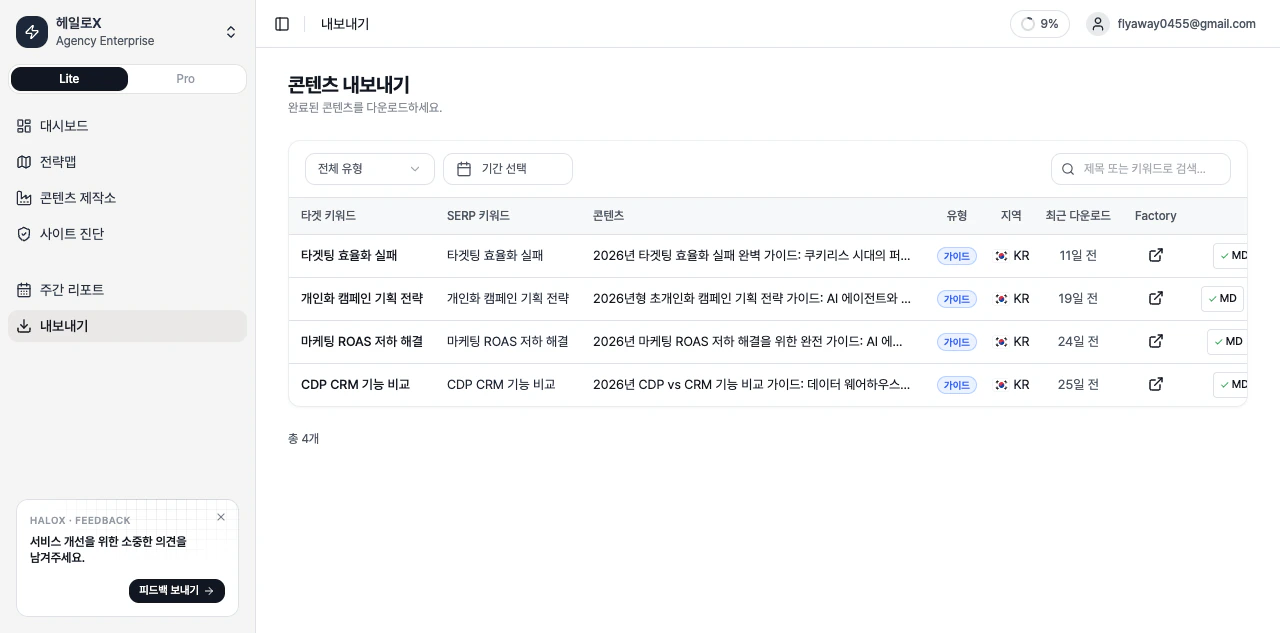 *Use Content Export to find, package, and hand off client-ready or team-ready outputs.*
Filters and search narrow the deliverable list by client, content type, and status, while table actions start download or Factory follow-up work.
## Main controls
| Control | What it checks | Use case |
| ------------------ | ---------------------------------------------------- | ----------------------------------------- |
| Search and filters | Content type
*Use Content Export to find, package, and hand off client-ready or team-ready outputs.*
Filters and search narrow the deliverable list by client, content type, and status, while table actions start download or Factory follow-up work.
## Main controls
| Control | What it checks | Use case |
| ------------------ | ---------------------------------------------------- | ----------------------------------------- |
| Search and filters | Content type
status
date
recipient | Find deliverables for a client or meeting |
| Export history | What was delivered and when | Prepare follow-up or resend materials |
| Content status | Draft
review
done
delivered | Assign follow-up work |
| Evidence links | Which keyword, prompt, or source produced the output | Explain why the deliverable exists |
## Weekly Report versus Content Export
| Item | Weekly Report | Content Export |
| ------------- | ------------------------------ | ----------------------------- |
| Purpose | Explain change and next action | Package deliverables |
| Sidebar area | Monitoring | Execution |
| Main question | What changed this week? | What should we send? |
| Output | Report narrative | Download/share/export history |
## Screen terms and column definitions
| Item | What it means | Basis |
| -------------- | --------------------------------------- | ----------------------------------------------------------------------------- |
| Target Keyword | Main keyword for the content job | Primary keyword linked to the Factory job. |
| SERP Keyword | Keyword used for search-result analysis | Query used for SERP analysis. |
| Content | Title of the exportable content | Download history for the same draft is grouped into one row. |
| Type | Content format | Filter by guide, howto, listicle, comparison, tutorial, review, news, or faq. |
| Region | Target market or locale | Separates the intended region or language. |
| Last Download | Most recent download time | Based on the latest export event for the draft. |
| Factory | Source Content Factory job | Opens the Factory detail page when linked. |
## Filters and download indicators
| Display | Meaning | Next action |
| ---------------- | --------------------------------- | ----------------------------------------------------------------- |
| Search | Search by title or target keyword | Narrow the table to a content item or keyword. |
| Date range | Filter by last export time | Review recently downloaded assets. |
| MD / HTML / DOCX | Supported download formats | Choose the format for the destination channel. |
| Checkmark | That format was downloaded before | It is a history marker; the format can still be downloaded again. |
| Empty state | No exportable content yet | Create or finish a draft in Content Factory first. |
## If you need the service metric definitions
Terms such as `rank`, `search volume`, `trend`, `AI`, `PAA`, `Citation Rate`, `Share of Voice`, and `gap type` are explained in the [screen metrics glossary](/en/glossary/screen-metrics). Use it when a KPI on this page needs a plain-language definition and a link back to the screen where it appears.
## Related docs
See where this feature sits in Pro mode.
Translate metrics into meeting language.
Turn signals into execution instructions.
Package findings for clients and executives.