> ## Documentation Index
> Fetch the complete documentation index at: https://docs.haloxlabs.ai/llms.txt
> Use this file to discover all available pages before exploring further.
# Content Production: from strategy analysis to evidence-backed drafts
> Content Factory turns strategic prompts and keyword clusters into citable content with definitions, comparisons, FAQs, evidence, and trust signals.
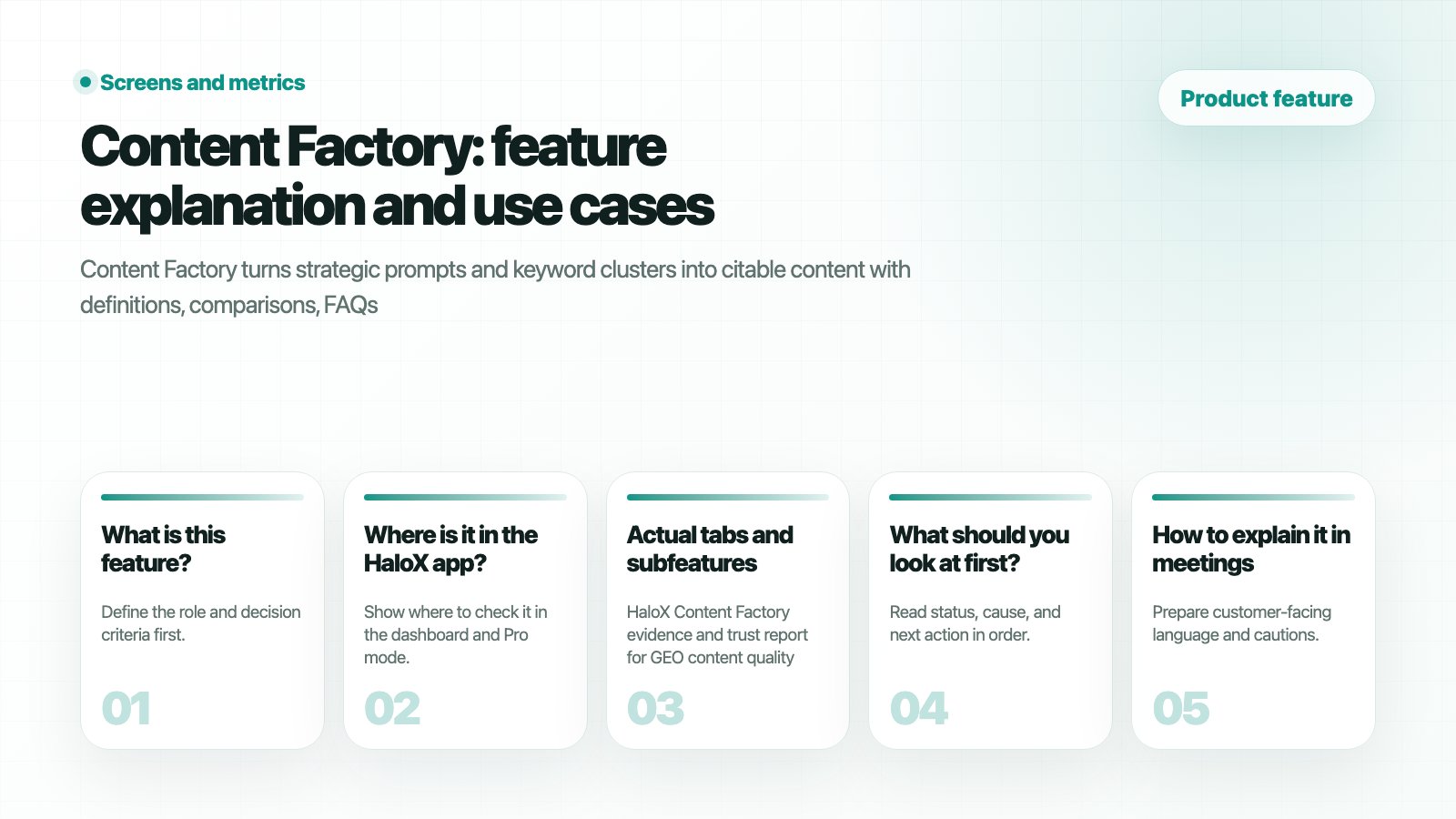 ## What is this feature?
**Content Factory** is the execution space for turning prompts and clusters into citable content with definitions, comparisons, FAQs, evidence, and trust signals. It is a decision point in the HaloX `diagnose → measure → prioritize → execute → report` loop. Teams use it to read the current signal, split the cause, and decide the next content, source, technical, or reporting action.
## HaloX app location
## What is this feature?
**Content Factory** is the execution space for turning prompts and clusters into citable content with definitions, comparisons, FAQs, evidence, and trust signals. It is a decision point in the HaloX `diagnose → measure → prioritize → execute → report` loop. Teams use it to read the current signal, split the cause, and decide the next content, source, technical, or reporting action.
## HaloX app location
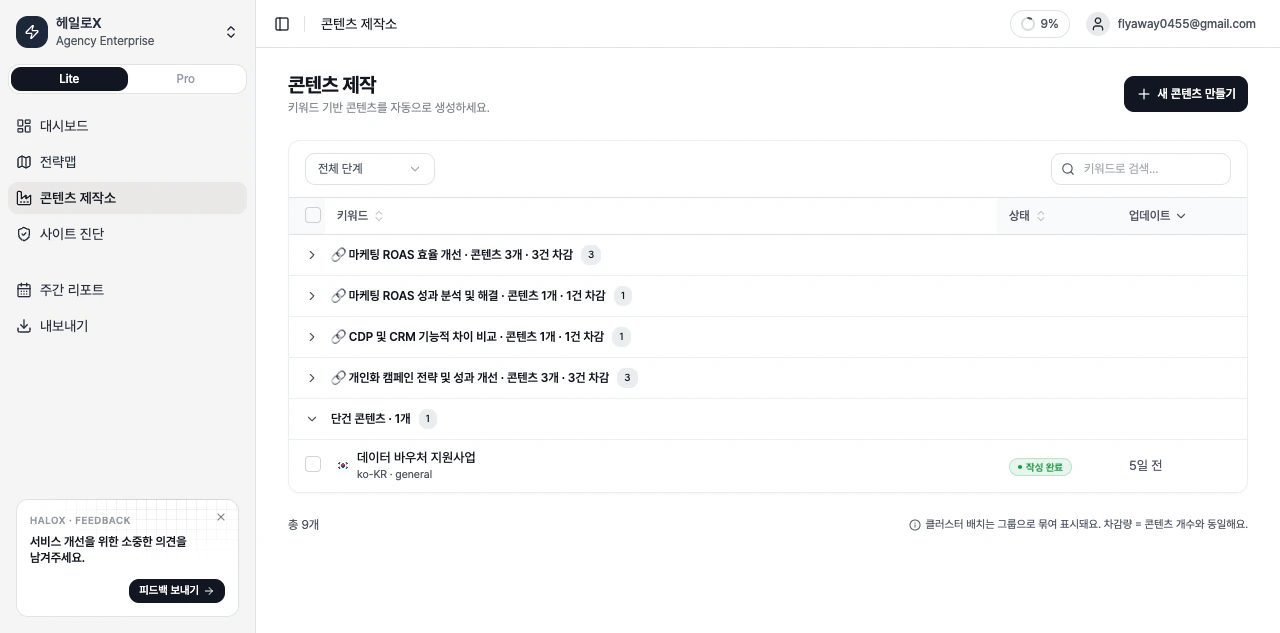 *HaloX Content Factory work list with strategy analysis, writing, and completed states*
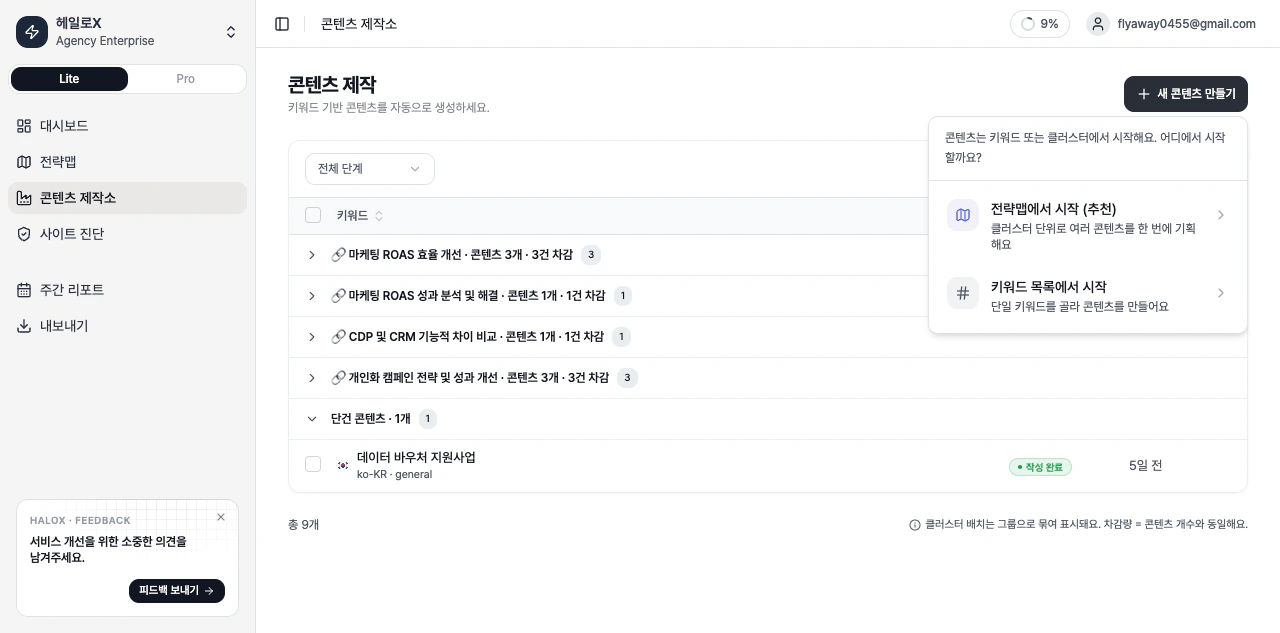 *HaloX Content Factory menu for creating AI search optimized content from strategy signals*
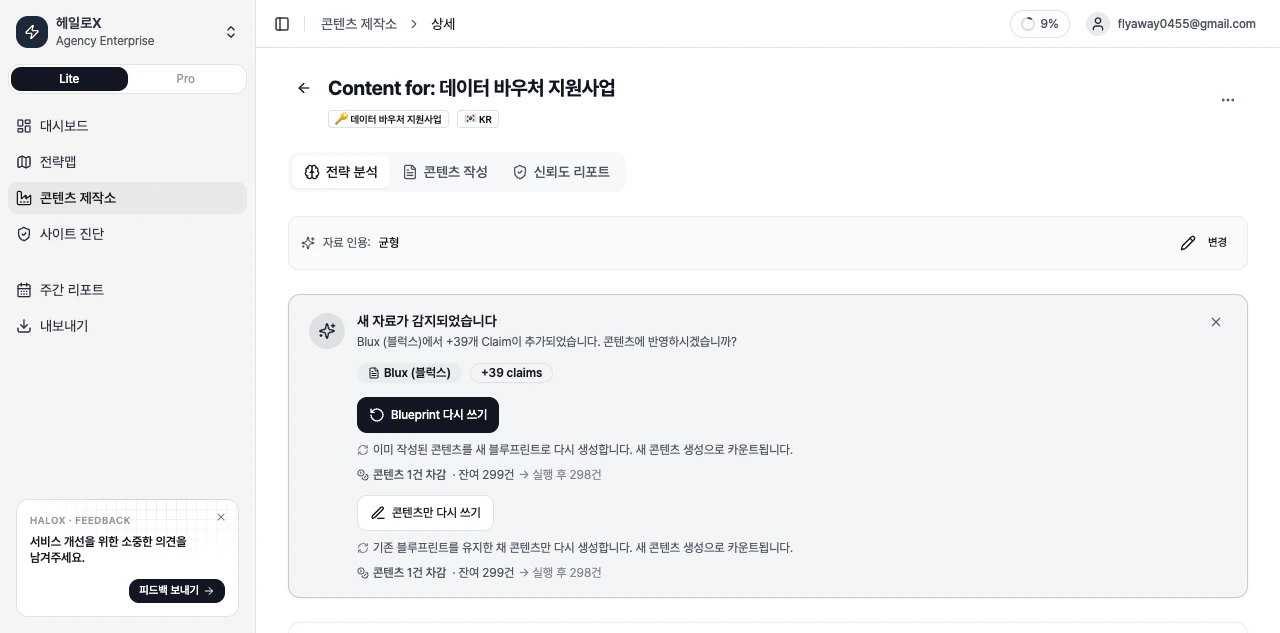 *HaloX Content Factory strategy analysis tab with AI search question intent and structure recommendations*
Content Factory is the Pro-mode execution area. Use strategy analysis to explain why the draft exists, then finish the draft and evidence tabs so the output can be published or delivered.
## Actual tabs and subfeatures
| Screen/tab | What to inspect | How to use it |
| --------------------- | -------------------------------------------------------------------- | --------------------------------------------------- |
| Job list | Strategy
*HaloX Content Factory strategy analysis tab with AI search question intent and structure recommendations*
Content Factory is the Pro-mode execution area. Use strategy analysis to explain why the draft exists, then finish the draft and evidence tabs so the output can be published or delivered.
## Actual tabs and subfeatures
| Screen/tab | What to inspect | How to use it |
| --------------------- | -------------------------------------------------------------------- | --------------------------------------------------- |
| Job list | Strategy
writing
translation
and completed states | See which content item is blocked. |
| New content modal | Strategy Map based creation or keyword based creation | Choose the input path. |
| Strategy analysis tab | Target questions
intent
competitive context
structure | Align on why the piece should exist before writing. |
| Content writing tab | Draft body and editing area | Refine the output into publishable copy. |
| Evidence tab | Supporting evidence and trust signals | Review sources and claims. |
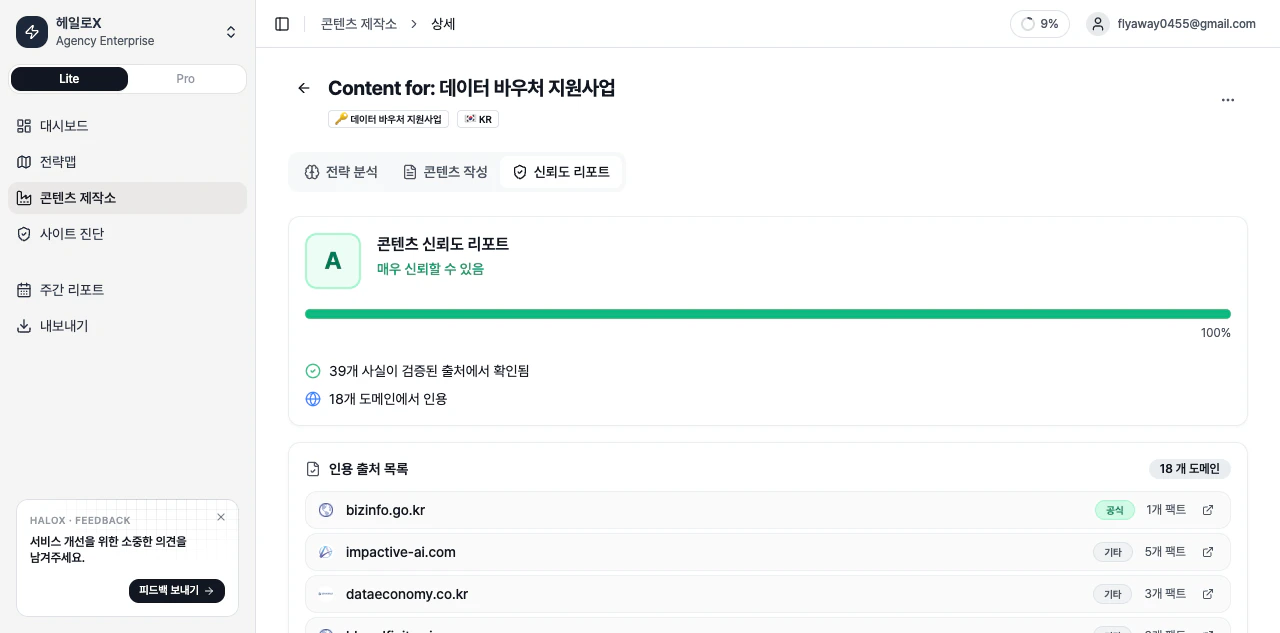 *HaloX Content Factory evidence and trust report for GEO content quality*
## Inputs and outputs
| Area | What it includes | Example |
| ------- | ------------------------------------------------------------------------------ | ------------------------------------------------------------------------------- |
| Inputs | Site
*HaloX Content Factory evidence and trust report for GEO content quality*
## Inputs and outputs
| Area | What it includes | Example |
| ------- | ------------------------------------------------------------------------------ | ------------------------------------------------------------------------------- |
| Inputs | Site
brand
strategic prompts
clusters
source candidates | Brand name
non-branded prompts
competitors
owned URLs |
| Signals | Scores
answers
sources
citations
web health
gap types | AVI
citation rate
source visibility
urgency
GEO opportunity |
| Outputs | Next priority and reporting sentence | Technical fix
content brief
source work
weekly report note |
## What should you look at first?
Replace “the score is low” with a cause-based sentence such as “official citations are weak for non-branded comparison prompts.”
Move technical blockers to Site Audit. Send question gaps to Prompt Analysis, source gaps to Citation Tracking, and content gaps to Content Factory.
Turn the signal into one next action: a cluster update, page edit, FAQ, source task or weekly report note.
## Main cards, tabs, or metrics
| Area | What to inspect | Decision standard |
| -------------- | ----------------------------------------------------------------- | ----------------------------------------- |
| Current signal | Score
card
answer
source
or page issue | Baseline and week-over-week movement |
| Gap | Weak prompt
source
content
or competitor advantage | Why the team should act |
| Priority | Urgency
GEO opportunity
AIO fit
SEO foundation | What should happen this week |
| Next action | Content
technical
source
or report work | Whether it can have an owner and deadline |
## Practical use cases
| Situation | What to do with this feature | Output |
| ---------------------------- | ------------------------------------------------------- | --------------------------------- |
| Before a customer meeting | Find weak prompt sets and source gaps. | One-page diagnostic summary |
| Internal execution meeting | Choose this week’s content, technical, or source tasks. | Ticket or content brief |
| Executive/customer reporting | Explain cause and next action, with the score. | Weekly report or export |
| SEO/GEO strategy | Read SEO foundation and AI answer signals together. | Strategy Map and keyword clusters |
## How to explain it in meetings
“This feature shows how far the brand travels inside AI search answers and what content, source, or technical action should happen next.” Avoid customer names, real URLs, and internal KPIs in public documentation.
## FAQ
### Does this feature complete the decision by itself?
No. HaloX features are connected. A signal in Content Factory should move into Site Audit, Strategy Map, Content Factory, Citation Tracking, or weekly reporting.
### Do scores map directly to business results?
Most GEO metrics are leading indicators. Mentions and citations usually move first; traffic, branded search and conversion prompts are checked later.
## Related guides and concepts
Start the first 30-minute workflow.
Translate metrics into meeting language.
Understand GEO, AVI, citation rate, and source visibility.
Turn movement into reporting language.
## How to read job list statuses
| Item | What it means | Basis | Next action |
| -------------------- | ------------------------------------------------------ | ------------------------------------------------------------ | --------------------------------------------------------- |
| Recommended Clusters | Content clusters suggested by Factory | Sorted by gap priority, then opportunity score | Review CRITICAL and GEO\_GAP clusters first. |
| Gap Context | SEO/GEO gap and citation comparison for the cluster | Brand GEO citation, competitor citation, and uncited prompts | Explains why the content job matters. |
| Uncited Prompts | Prompts where the brand is not cited | Uncited prompts linked to the cluster | Use them as FAQ and evidence targets. |
| Existing Jobs | Content jobs already linked to the cluster | Existing jobs matched to cluster keywords | Avoid duplicate creation and continue from current stage. |
| Ready / Pending | Jobs ready to create versus jobs needing more analysis | Blueprint availability | Pending jobs need auto-analysis or more input. |
## Pillar vs Support content
| Role | Meaning | Basis |
| -------------------- | ------------------------------------- | -------------------------------------------------------- |
| Pillar Job | Main content job for the cluster | Covers the primary keyword and central intent. |
| Support Jobs | Supporting content around the Pillar | Covers comparisons, FAQ, how-to, and detailed questions. |
| Total jobs to create | New Pillar plus selected Support jobs | Confirm before generation and quota consumption. |
## Detail tab roles
| Tab | Meaning | Completion cue |
| ----------------- | ---------------------------------------------------------- | --------------------------------------------------------- |
| Strategy Analysis | Analyzes intent, competitors, gaps, and evidence structure | Strategy output exists before writing decisions. |
| Content Writing | Draft generation and editing workshop | Draft exists and can be edited. |
| Evidence | Evidence, sources, and credibility report | Enough proof exists for AI search and customer reporting. |
## If you need the service metric definitions
Terms such as `rank`, `search volume`, `trend`, `AI`, `PAA`, `Citation Rate`, `Share of Voice`, and `gap type` are explained in the [screen metrics glossary](/en/glossary/screen-metrics). Use it when a KPI on this page needs a plain-language definition and a link back to the screen where it appears.