> ## Documentation Index
> Fetch the complete documentation index at: https://docs.haloxlabs.ai/llms.txt
> Use this file to discover all available pages before exploring further.
# Personas: manage content tone and role standards
> HaloX Personas define the role, tone, audience, and message priorities used by Content Factory so GEO content remains consistent across brands and deliverables.
## What is this feature?
**Personas** is an independent Pro-mode Misc feature. Evidence Library manages evidence; Personas manage the voice and role used when HaloX writes or packages content.
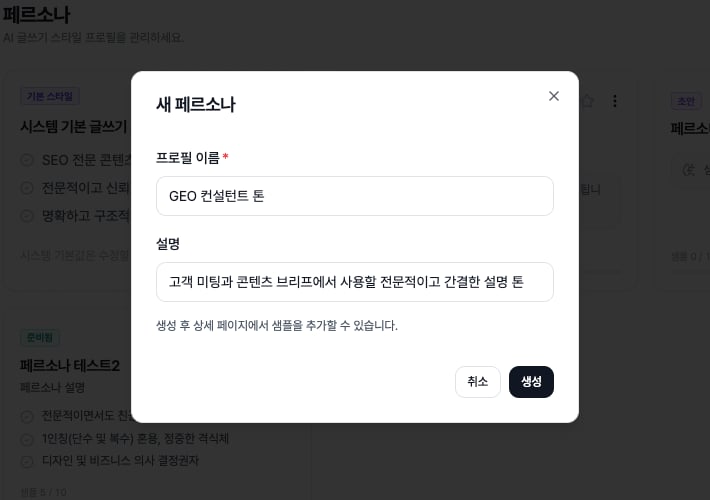 *Personas use the creation modal to define reusable role and tone rules for Content Factory. This focused crop keeps attention on the filled name and description fields before the `Create` action is used.*
## What should Personas manage?
| Item | Meaning | Effect on content |
| -------------------------- | -------------------------------------------------------------------- | ----------------------------- |
| Role | Spokesperson
*Personas use the creation modal to define reusable role and tone rules for Content Factory. This focused crop keeps attention on the filled name and description fields before the `Create` action is used.*
## What should Personas manage?
| Item | Meaning | Effect on content |
| -------------------------- | -------------------------------------------------------------------- | ----------------------------- |
| Role | Spokesperson
expert
consultant
customer-success voice | Viewpoint and authority level |
| Tone | Formal
friendly
expert
concise | Proposal and article style |
| Audience | Executive
marketer
SEO owner
developer | Depth and terminology |
| Preferred/blocked language | Brand-specific wording rules | Less repeated editing |
## How to read cards and status badges
| Display | Meaning | Basis |
| -------------------- | ----------------------------------------------- | ---------------------------------------------------- |
| System Default Style | Built-in writing style profile | Always shown and not directly editable. |
| Draft | Profile does not have enough material yet | Add more samples. |
| Learning | Style is being learned or analyzed from samples | Wait for the analysis output. |
| Ready | Profile can be used for content creation | Set it as default or connect it to Content Factory. |
| Sample Progress | Number of collected writing samples | At least 5 samples are required; 10 are recommended. |
| Default Star | Marks the current default persona | Click the star to change the default. |
## Analysis output and actions
| Item | Meaning | Next action |
| ------------------- | ---------------------------------------------------- | -------------------------------------------------------------- |
| Tone | Emotional temperature of the writing style | Check fit with brand voice. |
| Voice Type | Writing tendency such as explanatory or expert style | Pick the persona that matches the content type. |
| Signature Element | Repeated expression or structural trait | Adjust samples and reanalyze if it becomes too strong. |
| Analyze / Reanalyze | Runs style analysis from samples | Disabled until enough samples exist. |
| Prompt Snippet | Style instruction inserted into writing prompts | Use it to keep content voice consistent. |
| Clone / Delete | Duplicate or remove a profile | Clone for experiments; delete only after checking linked work. |
## If you need the service metric definitions
Terms such as `rank`, `search volume`, `trend`, `AI`, `PAA`, `Citation Rate`, `Share of Voice`, and `gap type` are explained in the [screen metrics glossary](/en/glossary/screen-metrics). Use it when a KPI on this page needs a plain-language definition and a link back to the screen where it appears.
## Related docs
See where this feature sits in Pro mode.
Translate metrics into meeting language.
Turn signals into execution instructions.
Package findings for clients and executives.