> ## Documentation Index
> Fetch the complete documentation index at: https://docs.haloxlabs.ai/llms.txt
> Use this file to discover all available pages before exploring further.
# Weekly Report: report AI visibility changes and next actions
> HaloX Weekly Report packages AVI, SEO, citation rate, source visibility, site issues, and content execution results into a weekly meeting-ready narrative.
## What is this feature?
**Weekly Report** is an independent Pro-mode Monitoring feature. It explains what changed this week, why it changed, and what the team should do next. It is separate from Content Export, which packages deliverables.
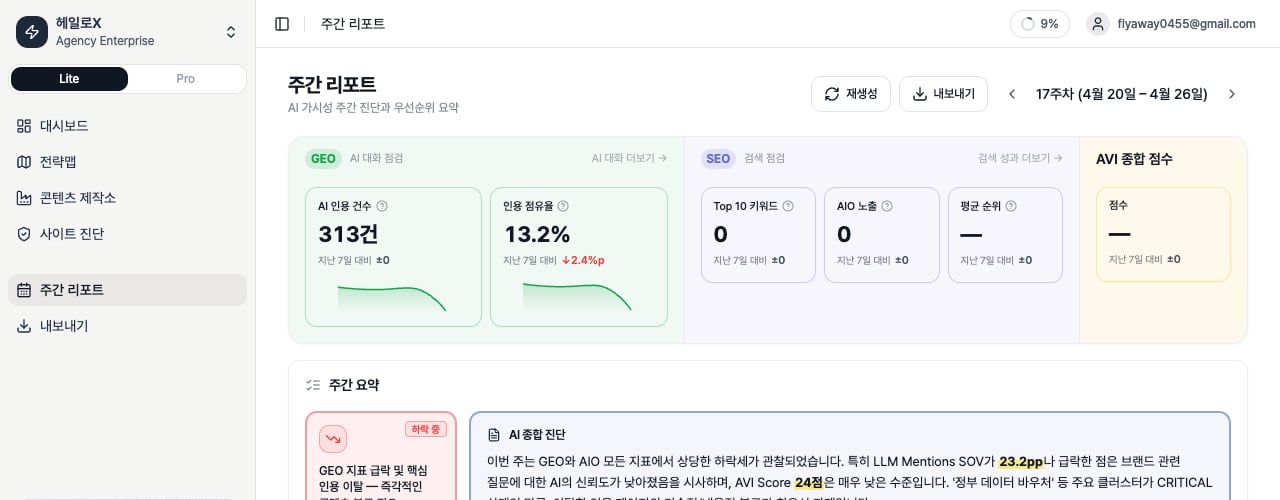 *The weekly report keeps period scores, key insights, and content execution cards together so teams can explain causes and next actions in meetings.*
The KPI row separates whether movement came from search, AI citations, or site health, and the summary below turns the cause into a meeting-ready explanation and next action cards.
## Sections to inspect
| Section | What to check | How to turn it into a report |
| ---------------- | --------------------------------------------------- | --------------------------------- |
| Summary | AVI, SEO, and GEO movement | What improved and what is blocked |
| Cause | Keyword
*The weekly report keeps period scores, key insights, and content execution cards together so teams can explain causes and next actions in meetings.*
The KPI row separates whether movement came from search, AI citations, or site health, and the summary below turns the cause into a meeting-ready explanation and next action cards.
## Sections to inspect
| Section | What to check | How to turn it into a report |
| ---------------- | --------------------------------------------------- | --------------------------------- |
| Summary | AVI, SEO, and GEO movement | What improved and what is blocked |
| Cause | Keyword
prompt
site
or source reason | Which workstream owns the issue |
| Execution result | What last week's work changed | Connect work to signal movement |
| Next action | Weekly priorities | Assign owner, date, and output |
## How to read the top KPI strip
| KPI | What it means | Basis | Example reading |
| ----------------- | ---------------------------------------------------- | ----------------------------------------------- | ---------------------------------------------------------------- |
| Top 10 | Number of tracked keywords ranking in positions 1-10 | Weekly ranking snapshot | Growth means stronger first-page search ownership. |
| Avg Rank | Average search rank | Average across ranked keywords; lower is better | `—` means the selected report snapshot has no displayable value. |
| AIO Exposure | Scale of brand exposure in AI Overview | AIO citation rate and keyword count | Read it separately from organic rank. |
| Brand Citations | Total brand citations in AI answers | Brand citation count from GEO runs or snapshots | Pair it with Citation Rate to understand efficiency. |
| GEO Citation Rate | Share of AI runs where the brand is cited | Cited Runs / Total Runs × 100 | Core weekly GEO outcome metric. |
| Engine Coverage | Coverage by AI engine | Displayed when engine data exists | `—` means the report does not have enough data for that value. |
## What scores and deltas mean
| Display | Meaning | Interpretation |
| --------------- | -------------------------------------------------- | ---------------------------------------------------------------- |
| Delta | Change versus the comparison period | `%p` means percentage-point change, not percent change. |
| Sparkline | Compact trend line | Uses daily data when available, otherwise weekly snapshots. |
| SEO Score | Search ranking and search-share movement | If it drops, inspect Top 10, average rank, and missing keywords. |
| GEO Score / AVI | AI-answer citation, mention, and coverage movement | If it drops, inspect Prompt Status and Citation Tracking. |
| Unified Score | Summary across SEO, GEO, and web health | Useful for reporting; use lower-level metrics for execution. |
## Metric definitions by section
| Section | Metrics to inspect | Meaning |
| -------------- | --------------------------------------------------------------- | --------------------------------------------------------------- |
| Site Health | Site Health Score, AI Readiness, Critical/Warning | Checks whether technical and structure issues block visibility. |
| SEO | Organic Presence, AIO Citation, Brand Position, SERP Features | Reads organic search and AI Overview together. |
| AIO | AI Search Citation Rate, competitor citation alerts | Shows who is selected as an AI-answer source. |
| GEO | AVI, Domain Distribution, Category Coverage, Prompt Performance | Reads brand visibility and source ownership across AI search. |
| Cluster Status | Gap Score, Priority Clusters | Decides which clusters should be executed first. |
| Content Status | New and lost citations, content changes | Checks whether content work created citation movement. |
| Action Plan | Recommended actions | Turns the report into this week's meeting actions. |
## Report states and export options
| Item | Meaning | Basis |
| ---------------- | -------------------------------------- | ----------------------------------------------------------------------- |
| Empty State | No report exists for the selected week | Generation can fail if data is missing or permissions are insufficient. |
| Copy as Markdown | Sharing for meetings or Slack | Copies the report body as Markdown. |
| Download DOCX | Customer report or proposal use | Exports an editable document file. |
## If you need the service metric definitions
Terms such as `rank`, `search volume`, `trend`, `AI`, `PAA`, `Citation Rate`, `Share of Voice`, and `gap type` are explained in the [screen metrics glossary](/en/glossary/screen-metrics). Use it when a KPI on this page needs a plain-language definition and a link back to the screen where it appears.
## Related docs
See where this feature sits in Pro mode.
Translate metrics into meeting language.
Turn signals into execution instructions.
Package findings for clients and executives.