
HaloX Features page thumbnail summarizing AVI: AVI: read AI visibility and source signals as five cards

What is this feature?

AVI is the AI Visibility Index. It shows whether AI answers find the brand, use trusted sources, and cite the right pages. It is a decision point in the HaloX diagnose → measure → prioritize → execute → report loop. Teams use it to read the current signal, split the cause, and decide the next content, source, technical, or reporting action.

HaloX app location
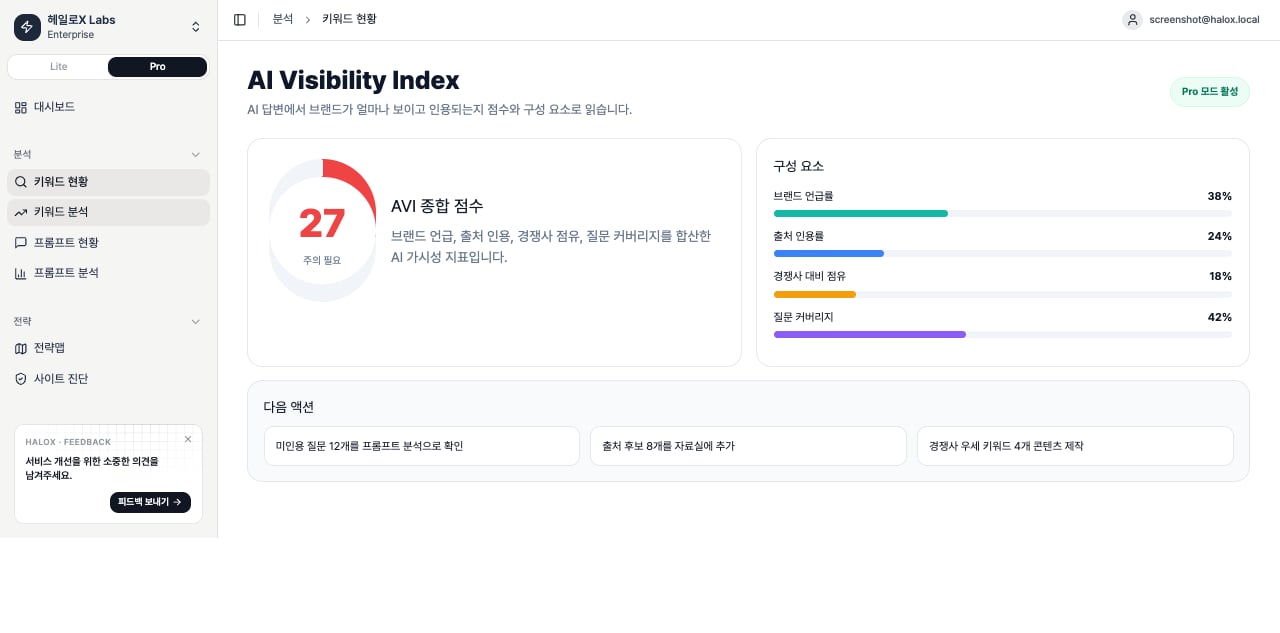
HaloX Pro mode dashboard showing the AI Visibility Index score with brand mention, citation and competitor coverage in the real app
This Pro-mode AVI screen shows the score components behind the headline number so the next action can be assigned by cause. Start with the aggregate score card and turn the current state into one sentence. Read the number together with the attention state and the component that is blocking progress. The component card separates brand mention rate, source citation rate, competitor share, and question coverage. When one component is weak, route the work to Prompt Analysis, Citation Tracking, or Site Audit. AVI appears as a dashboard summary metric, but it should be interpreted through the Pro-mode prompt status, prompt analysis, and citation-tracking workflow where questions and sources are reviewed together.

Inputs and outputs

AreaWhat it includesExample
InputsSite
brand
strategic prompts
clusters
source candidates
Brand name
non-branded prompts
competitors
owned URLs
SignalsScores
answers
sources
citations
web health
gap types
AVI
citation rate
source visibility
urgency
GEO opportunity
OutputsNext priority and reporting sentenceTechnical fix
content brief
source work
weekly report note

What should you look at first?

1

1. Summarize the state in one sentence

Replace “the score is low” with a cause-based sentence such as “official citations are weak for non-branded comparison prompts.”
2

2. Split the cause into four work types

Move technical blockers to Site Audit. Send question gaps to Prompt Analysis, source gaps to Citation Tracking, and content gaps to Content Factory.
3

3. Choose one next action

Turn the signal into one next action: a cluster update, page edit, FAQ, source task or weekly report note.

Main cards, tabs, or metrics

AreaWhat to inspectDecision standard
Current signalScore
card
answer
source
or page issue
Baseline and week-over-week movement
GapWeak prompt
source
content
or competitor advantage
Why the team should act
PriorityUrgency
GEO opportunity
AIO fit
SEO foundation
What should happen this week
Next actionContent
technical
source
or report work
Whether it can have an owner and deadline

Practical use cases

SituationWhat to do with this featureOutput
Before a customer meetingFind weak prompt sets and source gaps.One-page diagnostic summary
Internal execution meetingChoose this week’s content, technical, or source tasks.Ticket or content brief
Executive/customer reportingExplain cause and next action, with the score.Weekly report or export
SEO/GEO strategyRead SEO foundation and AI answer signals together.Strategy Map and keyword clusters

How to explain it in meetings

“This feature shows how far the brand travels inside AI search answers and what content, source, or technical action should happen next.” Avoid customer names, real URLs, and internal KPIs in public documentation.

FAQ

Does this feature complete the decision by itself?

No. HaloX features are connected. A signal in AVI should move into Site Audit, Strategy Map, Content Factory, Citation Tracking, or weekly reporting.

Do scores map directly to business results?

Most GEO metrics are leading indicators. Mentions and citations usually move first; traffic, branded search and conversion prompts are checked later.

Quickstart

Start the first 30-minute workflow.

Reading scores

Translate metrics into meeting language.

GEO glossary

Understand GEO, AVI, citation rate, and source visibility.

Reports

Turn movement into reporting language.

How AVI is calculated

AVI, or AI Visibility Index, summarizes how visible and cited the brand is in AI search on a 0-100 scale. It combines citation, mention, sentiment, coverage, and citation-position quality.
ComponentWeightWhat it meansBasis
Citation Rate35%Share of AI-answer citations that point to the brandBrand citations divided by total citations
Mention Share20%Share of AI answers that mention the brand in the answer textLatest runs where the brand is mentioned
Sentiment15%Positive, neutral, or negative direction of brand mentionsAverage sentiment score; missing values are treated as neutral.
Coverage15%Share of active prompts with cited latest runsCited prompts divided by active prompts
Position Quality15%How early the brand appears in the citation listFirst citation scores highest; later positions decline; uncited equals zero.
AVI = Citation Rate × 0.35 + Mention Share × 0.20 + Sentiment × 0.15 + Coverage × 0.15 + Position Quality × 0.15

AVI level thresholds

ScoreLevelMeaning
0-20CriticalThe brand is barely visible in AI answers.
20-40LowSome signals exist, but citation and mention coverage are weak.
40-60MediumBaseline visibility exists, but competitors can still overtake.
60-80HighThe brand is consistently visible for important questions.
80-100ExcellentCitation, mention, and position quality are strong.

What AVI is not

ItemDifference from AVI
Engine StabilityTracks platform execution or engine error conditions. Do not read it as AVI.
SEO rankMeasures Google search position. AVI measures visibility inside AI answers.
Brand mention onlyMention Share is only one component. Mention without citation is weaker evidence.

Example decisions

SituationInterpretationNext action
Mention is high, but Citation Rate is lowAI answers name the brand but do not use brand URLs as sourcesStrengthen official docs, cases, and FAQ evidence that can be cited.
Citation Rate is high, but Position Quality is lowThe brand is cited, but appears late in source listsImprove pages that answer the core prompt more directly.
Coverage is lowOnly a narrow set of prompts can find the brandReview prompt sets and connect missing question groups to content and sources.

If you need the service metric definitions

Terms such as rank, search volume, trend, AI, PAA, Citation Rate, Share of Voice, and gap type are explained in the screen metrics glossary. Use it when a KPI on this page needs a plain-language definition and a link back to the screen where it appears.