
What is this feature?
Keyword Analysis is a Pro-mode analysis feature that connects GSC/GA4 search performance with HaloX GEO decisions. Keyword Status shows which keywords need attention; Keyword Analysis explains whether the cause sits in queries, pages, search demand, or AI citation readiness.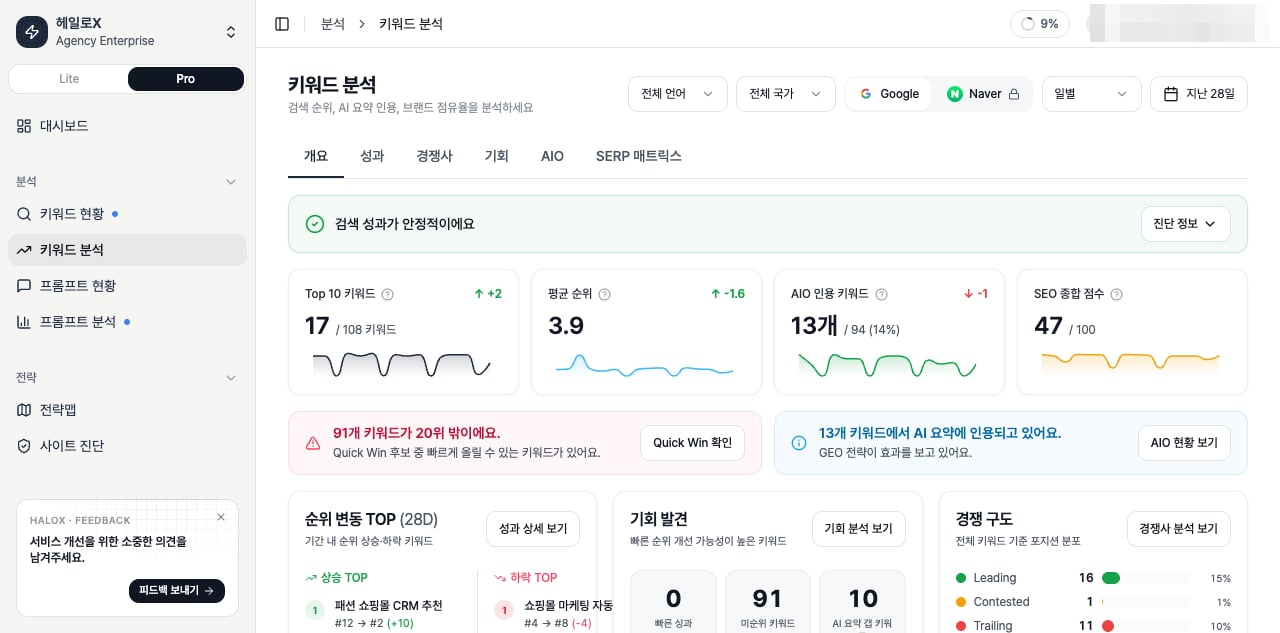
What should you inspect?
Operating sequence
1
1. Pick priority keywords from Keyword Status
Start with drops, uncited keywords, stale topics, and competitor-heavy queries.
2
2. Separate query and page causes in Keyword Analysis
Decide whether the problem is demand, page quality, evidence, or AI readability.
3
3. Move the work into Strategy Map or Content Factory
Convert the signal into cluster, page, or question-set work rather than a one-off keyword tweak.
How to read the core KPIs
Opportunity card definitions
Example decisions
If you need the service metric definitions
Terms such asrank, search volume, trend, AI, PAA, Citation Rate, Share of Voice, and gap type are explained in the screen metrics glossary. Use it when a KPI on this page needs a plain-language definition and a link back to the screen where it appears.
Related docs
Pro sidebar feature map
See where this feature sits in Pro mode.
Reading scores
Translate metrics into meeting language.
Content brief template
Turn signals into execution instructions.
GEO report example
Package findings for clients and executives.