
What is this feature?
Prompt Analysis is the workspace for measuring branded, non-branded, competitor, and buying-review prompts to find answer gaps. It is a decision point in the HaloXdiagnose → measure → prioritize → execute → report loop. Teams use it to read the current signal, split the cause, and decide the next content, source, technical, or reporting action.
HaloX app location
Prompt analysis belongs in the Pro-mode analysis area. Separate prompt status from prompt analysis, find weak question groups, then move them into Strategy Map or Content Factory.
Inputs and outputs
| Area | What it includes | Example |
|---|---|---|
| Inputs | Site brand strategic prompts clusters source candidates | Brand name non-branded prompts competitors owned URLs |
| Signals | Scores answers sources citations web health gap types | AVI citation rate source visibility urgency GEO opportunity |
| Outputs | Next priority and reporting sentence | Technical fix content brief source work weekly report note |
What should you look at first?
1. Summarize the state in one sentence
Replace “the score is low” with a cause-based sentence such as “official citations are weak for non-branded comparison prompts.”
2. Split the cause into four work types
Move technical blockers to Site Audit. Send question gaps to Prompt Analysis, source gaps to Citation Tracking, and content gaps to Content Factory.
Main cards, tabs, or metrics
| Area | What to inspect | Decision standard |
|---|---|---|
| Current signal | Score card answer source or page issue | Baseline and week-over-week movement |
| Gap | Weak prompt source content or competitor advantage | Why the team should act |
| Priority | Urgency GEO opportunity AIO fit SEO foundation | What should happen this week |
| Next action | Content technical source or report work | Whether it can have an owner and deadline |
Practical use cases
| Situation | What to do with this feature | Output |
|---|---|---|
| Before a customer meeting | Find weak prompt sets and source gaps. | One-page diagnostic summary |
| Internal execution meeting | Choose this week’s content, technical, or source tasks. | Ticket or content brief |
| Executive/customer reporting | Explain cause and next action, with the score. | Weekly report or export |
| SEO/GEO strategy | Read SEO foundation and AI answer signals together. | Strategy Map and keyword clusters |
How to explain it in meetings
“This feature shows how far the brand travels inside AI search answers and what content, source, or technical action should happen next.” Avoid customer names, real URLs, and internal KPIs in public documentation.FAQ
Does this feature complete the decision by itself?
No. HaloX features are connected. A signal in Prompt Analysis should move into Site Audit, Strategy Map, Content Factory, Citation Tracking, or weekly reporting.Do scores map directly to business results?
Most GEO metrics are leading indicators. Mentions and citations usually move first; traffic, branded search and conversion prompts are checked later.Related guides and concepts
Quickstart
Start the first 30-minute workflow.
Reading scores
Translate metrics into meeting language.
GEO glossary
Understand GEO, AVI, citation rate, and source visibility.
Reports
Turn movement into reporting language.
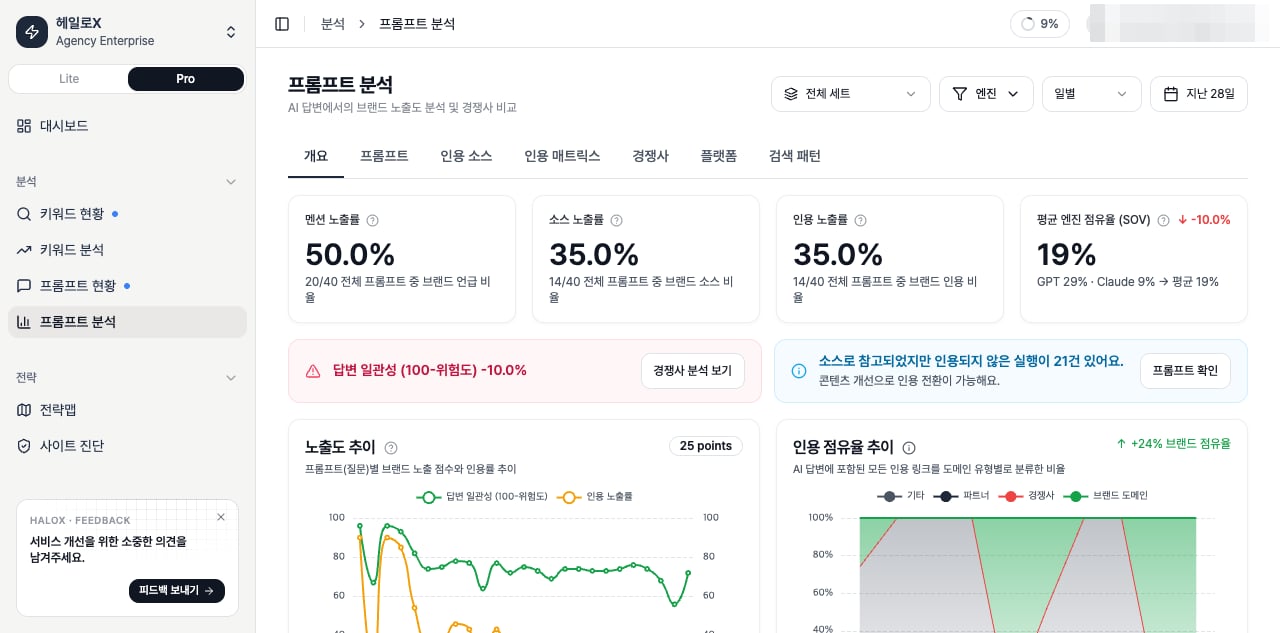
Analysis tab structure
| Tab | What it shows | Basis and interpretation |
|---|---|---|
| Overview | Brand mention, source, citation, and Share of Voice summary for the prompt set | Results are scoped by period, engine, and prompt-set filters. |
| Prompts | AI answers and brand or competitor signals by question | Use it to find where M/S/C breaks. |
| Sources | Domains and pages cited by AI answers | Classify sources as brand, competitor, partner, or other. |
| Matrix | Appearance, Source, and Citation distribution by prompt and engine | Identify whether weakness is engine-specific or question-specific. |
| Competitors | Competitor mentions and citation states | See which questions and sources competitors own. |
| Platforms | Performance differences by AI engine | Separate ChatGPT, Perplexity, Gemini, Claude, and other engine behavior. |
| Fan-out | Follow-up and expanded questions from a prompt | Send candidates to FAQ or cluster planning. |
How shared filters affect metrics
| Filter | Meaning | Caution |
|---|---|---|
| Period | Time range of analyzed runs | Coverage and SOV can change when the period changes. |
| Granularity | Daily, weekly, or other aggregation level | Use the same granularity when comparing trends. |
| Prompt set | Question group being analyzed | Do not directly compare AVI or Citation Rate across different sets without context. |
| Engine | AI engines included in the analysis | A single-engine view is an engine diagnosis, not a full market view. |
Reading Prompts, Sources, and Matrix together
| Step | What to inspect | Next action |
|---|---|---|
| 1 | Check Citation Coverage and SOV in Overview | Confirm whether brand sources are visible overall. |
| 2 | Find weak questions in Prompts | Separate Mention-only, Hidden Opportunity, and Competitor-only cases. |
| 3 | Inspect cited domains in Sources | Compare competitor sources with matching brand pages. |
| 4 | Check engine differences in Matrix | Decide whether the issue is engine-specific or source-wide. |
If you need the service metric definitions
Terms such asrank, search volume, trend, AI, PAA, Citation Rate, Share of Voice, and gap type are explained in the screen metrics glossary. Use it when a KPI on this page needs a plain-language definition and a link back to the screen where it appears.