
What is this feature?
The Pro sidebar is the operating map for deeper HaloX work. After you clickPro in the left sidebar, HaloX opens Analysis, Strategy, Execution, Monitoring, and Misc as separate working surfaces.
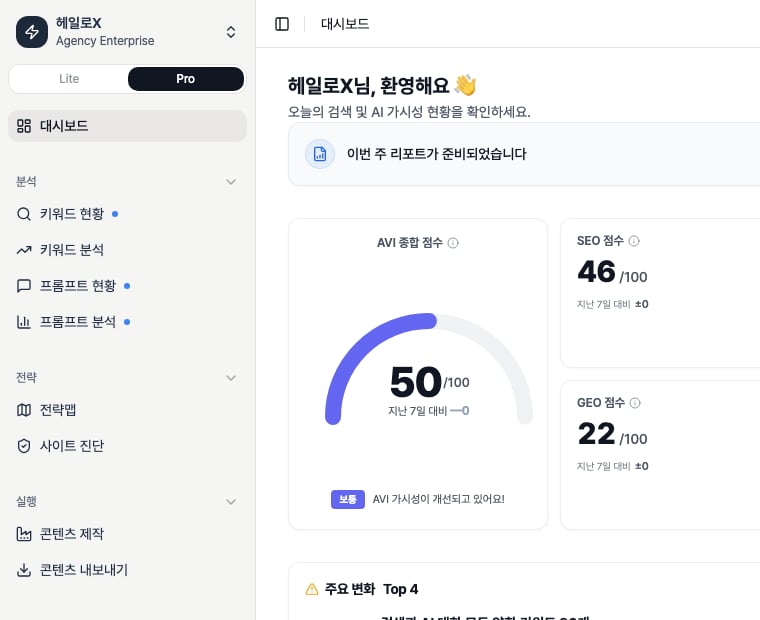
Pro in the left sidebar. Read the menu map against the Pro sidebar structure that continues through Analysis, Strategy, Execution, Monitoring, and Misc.
Sidebar structure
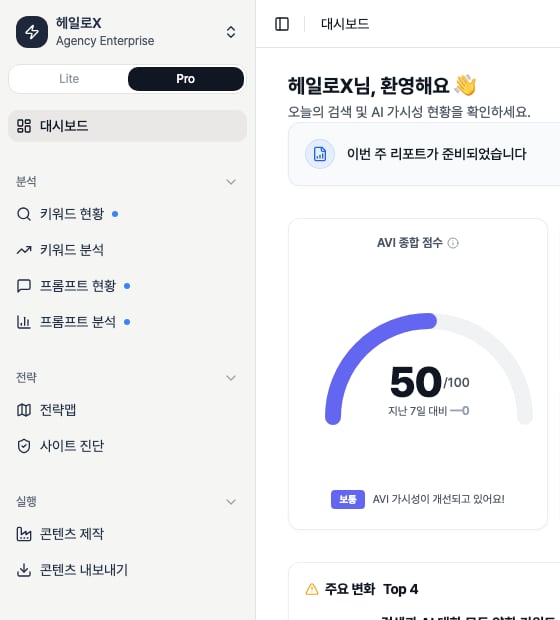
This page is based on the sidebar after the Pro button is selected, not on a Lite dashboard capture. In the app source, the menu order is Dashboard → Analysis → Strategy → Execution → Monitoring → Misc. The crop below focuses the same actual app screen around the selectedPro toggle, expanded sidebar groups, and a slice of the dashboard body. Confirm the active Pro state first, then compare each menu with the role table.
What should you inspect by area?
- Analysis
- Strategy
- Execution
- Monitoring
Keyword Status uses list and network views. Prompt Status separates prompts and sets. Weaknesses found here should move into Strategy Map or Content Factory.
Tabs that must be documented
Operating sequence
1
1. Switch to Pro mode and choose the left-sidebar area
Use the Pro sidebar for root-cause analysis and execution management. Lite is for first-pass diagnosis and quick status reading.
2
2. Use Pro analysis menus to find the cause
Separate keywords, prompts, sources, and competitive conditions.
3
3. Use strategy menus to choose the work
Confirm the weekly priorities through Strategy Map clusters and Site Audit issues.
4
4. Finish with execution and monitoring outputs
The loop should end in content, exports, and weekly reports.
Pro sidebar area definitions
Routes and purpose by menu
Badges and workspace switching
If you need the service metric definitions
Terms such asrank, search volume, trend, AI, PAA, Citation Rate, Share of Voice, and gap type are explained in the screen metrics glossary. Use it when a KPI on this page needs a plain-language definition and a link back to the screen where it appears.
Related docs
Product feature map
Start from the overall screen structure.
Keyword Status
Use keyword lists and network views.
Monitoring Dashboard
Track connected data and trends.
Weekly Report
Create report narratives and next actions.
Content Export
Package delivery outputs.