
What is this page?
The Product feature map connects HaloX features through thediagnose → measure → strategize → execute → report loop. Start with workspace mode, then move into sidebar menus and feature tabs. Read AVI and SEO together before deciding whether the issue belongs to search visibility or GEO execution.
Workspace structure
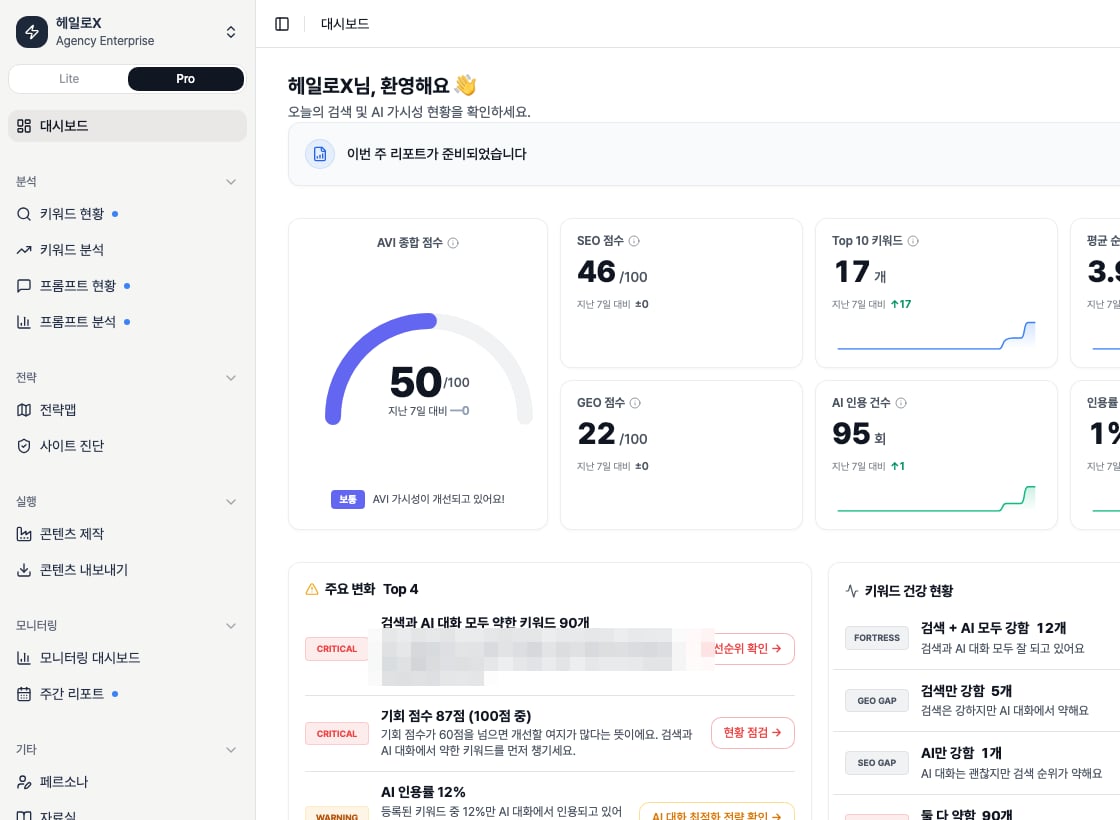
Pro sidebar feature list
Detailed feature docs
Pro sidebar feature map
Read each sidebar menu as a product feature.
AI visibility dashboard
Understand AVI, SEO, citation rate, and web health cards.
AI Visibility Index
Read AVI through score, source, and web-health signals.
Keyword Status
Use list and network views for keyword opportunities.
Keyword Clusters
Turn question groups into content work units.
Prompt Status
Manage question sets and mention/source/citation status.
Prompt Analysis
Interpret AI answer and competitive patterns.
Citation Tracking
Find source gaps and competitor citations in AI answers.
Strategy Map
Prioritize clusters and opportunities.
Site Audit
Use Overview, Issues, Pages, SEO, and GEO tabs.
Content Factory
Use strategy analysis, writing, and evidence tabs.
Monitoring Dashboard
Track GSC/GA4 and HaloX signal changes.
Keyword Analysis
Separate GSC/GA4 query and page causes.
Weekly Report
Create meeting narratives and next actions.
Content Export
Package client-ready deliverables.
Personas
Manage content tone and role standards.
Evidence Library
Manage product, topic, and source evidence.
How to read the product
1
1. Start with Lite mode status
Read AVI, SEO, citation rate, and web health together, including lower dashboard cards.
2
2. Split the cause in Pro mode
Decide whether the cause lives in keywords, prompts, site issues, clusters, content, or reports.
3
3. Inspect tabs and detail panels
Each tab produces a different decision. Site Audit, for example, must be read through Overview, Issues, Pages, SEO, and GEO tabs.
4
4. Connect the finding to a guide or output
Feature reading should lead to one next output.
Related guides and glossary
Quickstart
Follow the first 30-minute operating path.
Reading scores
Turn metrics into meeting language.
Content brief template
Turn feature signals into production instructions.
GEO glossary
Understand GEO, AVI, citation rate, and source visibility.